For iPhone · one breath before you scroll

Arrive on purpose,
not by accident.

The Pause puts one calm breath between you and the scroll. No blocking, no guilt, no streaks to break — just a small moment of awareness before you arrive.

Requires iPhone on iOS 26. Sets up in about two minutes.

Works with the apps that pull you in

Instagram
TikTok
YouTube
Reddit
X
Facebook
Snapchat
How it works

One breath at the doorway.

The Pause meets you the moment you reach for an app that tends to pull you into autopilot.

1

Tap the app

Open Instagram, TikTok, Reddit, YouTube — whichever app you chose to be met at.

2

The Pause opens first

Before the app appears, a calm breathing screen greets you for about ten seconds.

3

Breathe, then choose

Take one breath, set a simple intention, and continue — this time, on purpose.

Then continue exactly as you planned — just more intentionally.

The science of the scroll

The scroll is a loop.
A breath breaks it.

Most opens aren't decisions — they're a habit loop running on autopilot. The Pause slips a few seconds of awareness in, right where the reflex lives.

The autopilot loop, interrupted by The Pause Boredom · stress Reflex reach Scroll Reward one breath

It's a habit, not a decision

A trigger — boredom, a lull, a flicker of stress — fires an automatic reach for your phone before you've consciously chosen anything.

Variable rewards keep it spinning

Feeds pay out on an unpredictable schedule — the same mechanic that makes slot machines hard to put down. The loop rewards the reflex, and repeats.

A short pause restores choice

Interrupting the reflex for even ten seconds is enough to turn autopilot back into a decision. You're not blocked — you're awake.

The Pause doesn't fight the loop. It just wakes you up inside it.

Why it works

Awareness, not restriction.

The Pause never blocks, shames, or counts your hours. It just hands the choice back to you.

A pause, not a wall

You always continue to your app. No lockouts, no timers running out, no being told no.

Choice over guilt

No shame, no “you've wasted X hours.” Just a moment to notice the intention behind the tap.

Never the same twice

The breath varies each time, so it stays a real moment instead of background noise.

The Pause home screen showing the breathing orb, a day streak and arrivals
Home — your streak, and calm on demand.
The Pause breathing screen counting down a breath before Instagram
The breath — a changing cue, never rote.
The doorway choice screen reading One breath is enough with a control to open Instagram
The choice — always yours to make.
From early users

Small moment. Real difference.

“I realized I was opening Instagram because I was avoiding work.”

— Beta tester

“The pause was short enough that I actually kept using it.”

— Beta tester

“It doesn't nag me. It just gives me a second to catch myself.”

— Beta tester

“I wasn't trying to spend less time on my phone. I was trying to stop arriving there by accident.”

Setup

About two minutes, once per app.

The Pause works through Apple Shortcuts — the private, on-device way iOS lets one app greet you at the doorway of another.

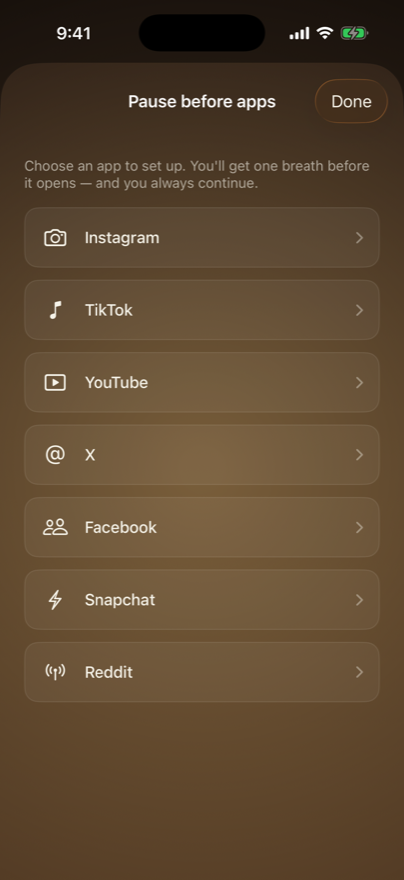
1
The Pause showing a list of apps to choose from
Pick the app you want to be met at.
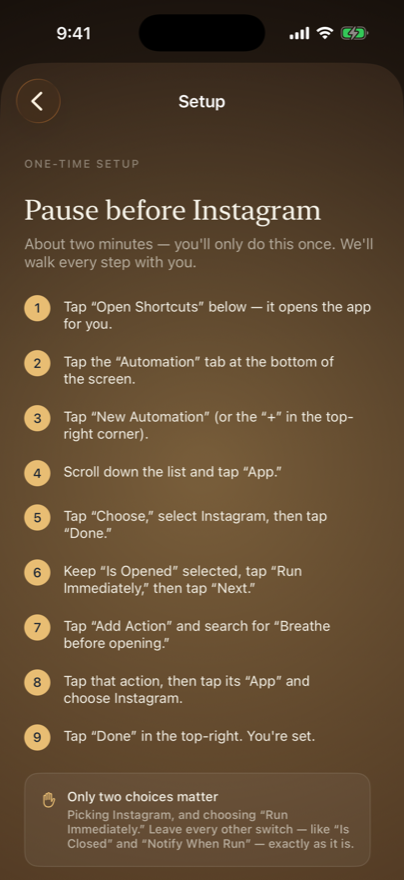
2
The Pause showing its nine-step setup walkthrough
The Pause spells out every step, then opens Shortcuts for you.
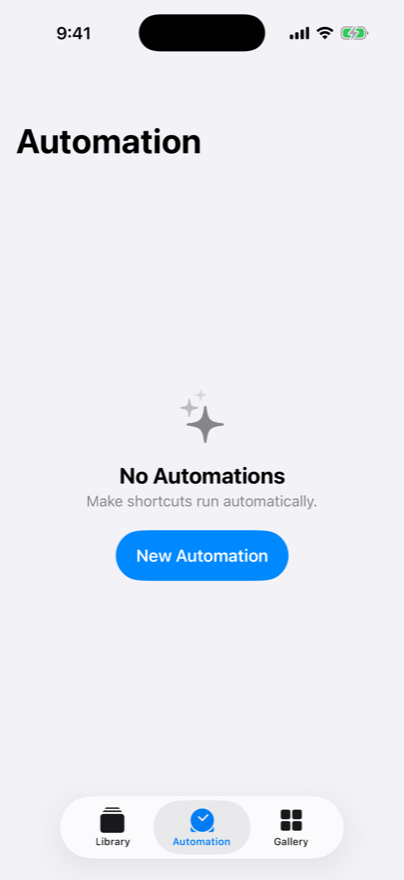
3
The Shortcuts app Automation tab with a New Automation button
In Shortcuts, tap Automation → New Automation.
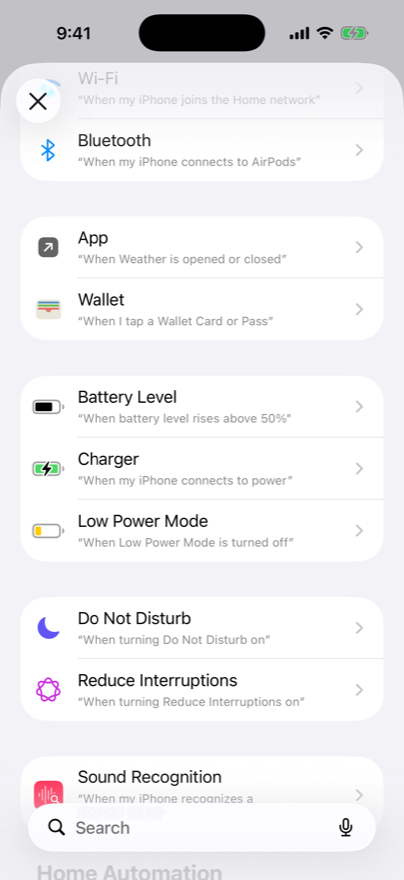
4
The Shortcuts trigger list with the App trigger visible
Choose the App trigger — then your app, and “Run Immediately.”

Only two choices actually matter — picking your app, and “Run Immediately.” Leave every other switch exactly as it is. The Pause keeps the instructions on screen the whole time.

Why I made this

I kept opening Instagram without ever deciding to. It was like opening the fridge for the hundredth time — not hungry, just bored, hoping something new had appeared since I last looked. Pure reflex.

I tried the blockers. Being locked out never taught me anything; it just made me good at waiting for the timer, and a little ashamed in the meantime. And the honest truth is that I usually did want to open the app. I just wanted to mean it.

So I built the smallest thing that might help: one breath at the doorway. No walls, no guilt, no streak to feel bad about breaking. Social media isn't going anywhere — but the reflex can.

— Todd

If it helps, or if it doesn't, I'd genuinely like to know: hello@trythepauseapp.com

Pricing

Pay what feels fair.

Mindfulness shouldn't be a luxury. Start free forever — and if The Pause earns a place in your day, choose the support that feels right.

Free

$0
Forever. No account, no ads.
  • Unlimited pauses
  • One app at the doorway
  • Cool & Warm themes
  • The full breath, always free

Afterglow — lifetime

One payment, yours forever. Choose your support:
$2.99
Pay what you can
$9.99
Fair
Recommended
$19.99
Supporter
$39.99
Generous
  • The doorway for every app
  • Midnight & Blossom themes
  • Everything in Free

If money's tight, pay what you can. If you're able, a higher tier helps keep The Pause accessible to everyone. Founding-supporter pricing — only during launch.

FAQ

Good questions.

Does The Pause block apps?

No. The Pause never blocks or locks anything. You always continue to your app — it just adds one calm breath first. It's a pause, not a wall.

Does it track my activity?

No. The Pause doesn't watch what you do inside your apps and doesn't track your browsing. It only knows when you chose to take a breath.

Why does it use Apple Shortcuts?

Shortcuts is the private, on-device way iOS lets one app greet you at the doorway of another — with no invasive permissions and no monitoring. It's what makes the gentle, non-blocking approach possible.

Which apps can I use it with?

Instagram, TikTok, Reddit, YouTube, X, Facebook, and Snapchat — set up any of them in about two minutes each. More on the way.

Is my data private?

Yes. No account to create, no personal data collected, no ads, and nothing sold. Your pauses are anonymous.

What if I still want to open the app?

Then you open it — that's the whole point. The Pause never tries to stop you. It just helps you arrive on purpose instead of by reflex.

What do I need to run it?

An iPhone on iOS 26 (the doorway feature relies on a capability introduced there). The standalone breath works more broadly.

Your next scroll
can be intentional.

Download The Pause